The page loads, the click ID doesn't
A paid click arrives carrying a click ID: gclid from Google Ads, fbclid from Meta, msclkid from Microsoft Advertising. The tag on the landing page reads it from the URL, and that ID is what later ties a conversion to the click. UTM parameters travel the same way and tell analytics where the visit came from.
Between the ad and the landing page there are often redirects: a click tracker, http to https, the bare domain to www, a trailing slash, an old path to a new one. Each is a rule somebody wrote, and each keeps the query string only if the rule says so. When one of them doesn't, the visitor still lands on the right page and the server still answers 200. Nothing errors. The address bar is shorter than it should be, and that's the only sign.
What that costs depends on what else the site captures. If a redirect drops the click ID and nothing else stored it (server-side tagging, or enhanced conversions), the conversion isn't tied to the click: it falls back to modelled or is lost, and bidding trains on less. If it drops the UTMs, analytics that reads them from the landing URL would file the visit under the referrer or Direct.
You can find this by hand. Paste the tagged URL into a new tab, watch the address bar, then open the network panel and read each hop. It works for the simple case, and it's slow to explain to whoever owns the redirect. It also can't show you the hops Chrome handles on its own, which is where some of the losses sit (section 04). So I built the check into an extension that reads the chain for you and writes the ticket.
Three clicks, three ways to lose one
These are the three examples the video uses. Each is a synthetic chain on reserved example domains, drawn by the extension's own code: no client and no real website appears in them. The verdict lines and findings are quoted as version 1.0.1 prints them.
Parameters lost at hop 2
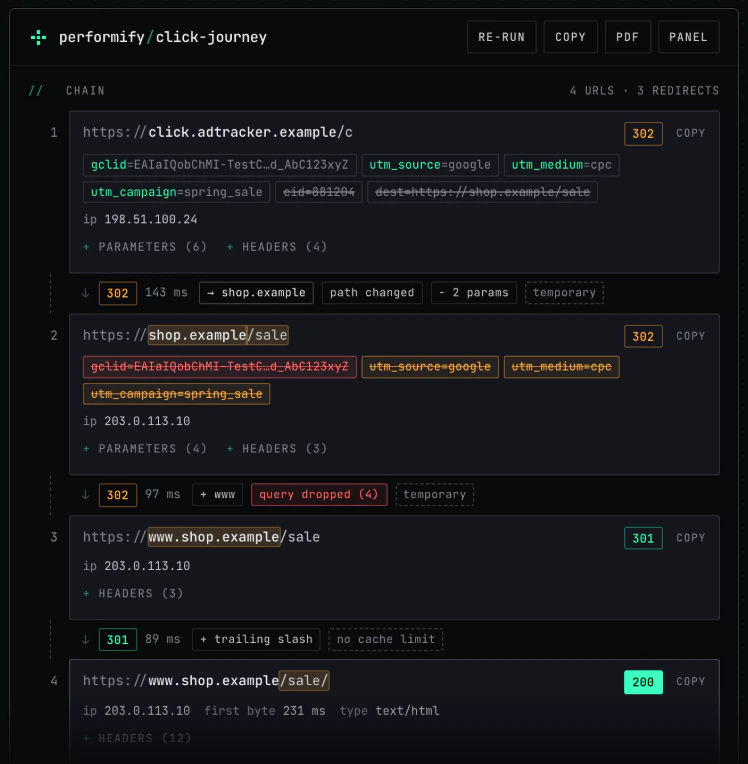
An ad click goes through a click tracker to a shop. The shop redirects the bare domain to www, then adds a trailing slash.
3 redirects · all 4 tracking parameters lost at hop 2

1  302  click.adtracker.example/c?cid=881204&dest=...&gclid=...&utm_source=google&...
2  302  shop.example/sale?gclid=...&utm_source=google&utm_medium=cpc&utm_campaign=spring_sale
3  301  www.shop.example/sale
4  200  www.shop.example/sale/
The verdict names the hop, and the findings under it say what was seen: "gclid lost at hop 2 (302). Google Ads click ID. Present on the first URL, absent from the final one." The UTM finding states its consequence conditionally: "Analytics that reads UTMs from the landing URL would file this visit under the referrer or Direct."
The hop itself shows what changed between one URL and the next. Leaving URL 2, the chips read "+ www" and "query dropped (4)". That is the whole ticket: one rule on the shop's own server, the one that adds www, has to carry the query string. The click tracker in front of it passed all four tracking parameters through.
An http link, then a meta refresh
A paid social link written with http://, pointing at a promo page that forwards to the real landing page with a meta refresh.
1 redirect · all 4 tracking parameters lost at hop 2 · noindex

1  HSTS          http://promo.example.net/offer?fbclid=...&utm_source=facebook&...
2  meta refresh  https://promo.example.net/offer?fbclid=...&utm_source=facebook&...
3  200           https://www.example.net/landing
Hop 1 isn't the site's redirect at all. Chrome rewrote http to https from its own memory of the site's HSTS policy and contacted no server, so the verdict counts one redirect, not two, and the report carries a note about the capture: "Hop 1 is Chrome's own HSTS redirect. No server was contacted. The site's real http to https redirect, its status code and whether it keeps the query string, was not tested."
Hop 2 is where the tracking went. The promo page loaded, ran, and sent the browser on to a URL with no query string. A client-side redirect keeps the query string only if someone wrote code to carry it, and it's slower than a server redirect because the page has to download first: 639 ms here, measured on that connection and indicative only.
The verdict also ends on a fact, "noindex", in a neutral tone. That is correct for a paid-only landing page and a problem if the page should rank. The extension can't know which, so it states it and doesn't grade it.
The ID arrives, the cookie holds an earlier click
The third click is the one a check of the URL passes. One 301, and all four parameters reach the final URL unchanged.
1 redirect · tracking kept · _gcl_aw not updated
The extension keeps going past the URL. It lists the requests the landing page sent to known tag endpoints, and here the Google Analytics 4 and Google Ads requests both carried the gclid. Then it reads the attribution cookies. _gcl_aw, where the Google tag keeps the click ID for later page views, holds a different gclid from the one on the URL. The finding: "The cookie still identifies the earlier click, so a conversion may be credited to that one."
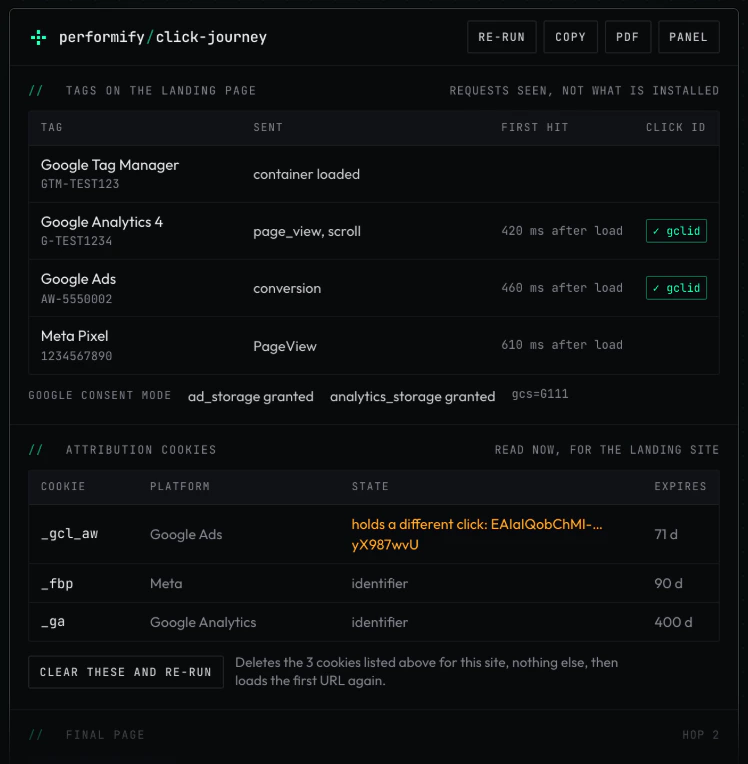
The "may" is deliberate. The extension reports what the cookie shows; what the platform then does with it isn't something a browser can see. Where consent explains a result, the report says that instead: with ad_storage denied under Google consent mode, the Google tag withholds the click ID from its requests and may not write the cookie at all, so both are reported as expected, not as faults. (If consent is where your investigation ends up, the Consent Mode pre-flight check is the next read.)
What the redirect checker looks at
Open it on any page and it shows the chain the browser took to get there: each URL, its status code, how long the hop took and what changed between one URL and the next. Above the chain is the verdict line and a short list of what to fix. Version 1.0.1 has 73 rules, each with an ID you can quote in a ticket. They cover:
- The redirect chain. Server redirects (301, 302, 303, 307, 308), meta refresh, JavaScript redirects and forms that submit themselves, each with its timing. Temporary redirects, long chains, loops, redirects from https to http and chains that end on an error are flagged.
- Tracking parameters. Whether click IDs (
gclid,gbraid,wbraid,dclid,msclkid,fbclid,ttclid,li_fat_idand others) and UTM parameters reach the final URL, and which hop dropped, renamed or altered them. A click ID that arrives lower-cased or truncated is flagged too: it looks present and no longer matches the click. - Tags on the landing page. Which requests went out to known advertising and analytics tag endpoints, and whether they carried the click ID.
- Attribution cookies. Whether the click ID reached the cookie a platform reads it from, or whether that cookie still holds an earlier click.
- The final page. Canonical, robots directives and HSTS.
- What Chrome did on its own. When the browser upgraded a link to HTTPS or replayed a redirect from its cache, the server was never asked. The report says so, so that you don't report a redirect that wasn't tested.
Findings come in five grades. Bad breaks attribution, indexing or the page itself. Warn costs something or is probably a mistake. Info is worth knowing and often intentional. Good is a quiet tick, so you know a check ran and passed. The fifth isn't about the site: a capture note is a limit on what this capture can tell you, and it's the subject of the next section.
What Chrome hides, and how the report says so
A redirect checker that runs in the browser sees what the browser's extension APIs report, and they don't report everything. I checked each behaviour against Chrome's documentation and by logging the raw events in Chrome 154. Where the two disagreed, observation won. Five of the results change how you should read any redirect chain captured in a browser, mine included.
Chrome upgrades http links before any request is sent
For a navigation to an http:// URL, Chrome tries https:// first, whether or not the site has HSTS. No http request is made and no redirect is reported. The only traces are the URL the navigation started on and a redirect flag with no redirect to go with it. The same happens mid-chain when a redirect points at an http URL.
The consequence is blunt: in current Chrome you can't observe a site's own http to https redirect by visiting it. Its status code, and whether it keeps the query string, are invisible to any extension built on these APIs. That redirect is one of the places a query string gets dropped.
An HSTS upgrade is Chrome's own 307
When a site has an HSTS policy and Chrome has seen it, an http link shows up as a 307 with the status line "Internal Redirect" and no server IP. It looks like a redirect in the chain and no server was involved. Read as the site's redirect, it's a hop the site never made, and the redirect that does exist goes untested. Click Journey labels it as Chrome's own, leaves it out of the redirect count, and says the server's real redirect wasn't tested.
The extension could test that hop by making a request of its own. I ruled that out: it would break the promise that the extension makes no network request, and it would be a second click on any click tracker in the URL. So the report says "not tested", and that hop is one to check from outside the browser.
A cached 301 replays without asking the server
Chrome replays a permanent redirect from its cache, and the server isn't asked. That includes a plain 301 sent with no caching headers at all. It's the usual reason a redirect that has been fixed still looks broken to the person who reported it. The extension marks a replayed hop, because what you are looking at is what the server said last time, and suggests testing in a new Incognito window or after clearing the cache. A 301 or 308 sent with no cache limit gets a chip on the hop for the same reason: a mistake there can outlive the fix for returning visitors.
The client-redirect flag is unreliable in both directions
Chrome has a flag for "this navigation was a client-side redirect". Observed, it tracks whether the navigation replaced the history entry, which isn't the same thing.
| What the page did | Flagged as a client redirect? |
|---|---|
| Meta refresh, instant or delayed | yes |
| location.replace(), or location.href during page load | yes |
| location.href 1.5 s after load, nobody clicking | no: identical to a click |
| A form that submits itself on load | no |
| A person clicks, and the handler calls location.replace() | yes, wrongly |
| A person clicks a plain link | no (correct) |
So the flag misses delayed JavaScript redirects and self-submitting forms, both common on "you are being redirected" pages and on sign-in and payment hand-offs, and it fires on an ordinary click. Click Journey treats it as one input among several: whether a person started the request, whether anyone touched the page, where the navigation was headed and how long the page had been open. A hop it worked out this way is labelled as inferred, so you know which parts of a chain Chrome reported and which it didn't.
Some pages produce no request at all
A page answered by the site's own service worker, or restored from the back/forward cache, makes no request to record, so there is no status code and there are no headers. A page Chrome prerendered was fetched before you navigated, and its timings are from that earlier fetch. In each case the view says what happened instead of showing a short chain as if it were whole.
A capture note is never a fault on the site. It marks the edge of what was tested. If the note says the http to https redirect wasn't tested, the report is clean only for the hops after it.
What it reads, and where that goes
To record a chain on whatever site you're testing, the extension needs access to all sites. Chrome words that permission as "Read and change all your data on all websites". The extension doesn't change page content. This is what it reads:
- For each page you load in a tab: the URLs requested, their status codes, response headers, timing and server IP address. Cookie values in response headers are discarded; only cookie names and attributes are kept.
- One request header,
Sec-Fetch-User, kept as a single true or false: whether a person started the navigation. - From the page itself: its canonical, robots and meta refresh tags, and the time of your first click or key press on it (the time only, not what you clicked or typed). This is how a redirect is told apart from a link you followed.
- The addresses of requests to a fixed list of advertising and analytics tag endpoints.
- When you open the view: the cookies for the landing page, from which only a fixed list of attribution cookie names is kept. The rest are discarded at once.
All of it stays in the browser. It's held in memory, in Chrome's session storage for the extension, and is cleared when the tab closes, when the extension is reloaded or updated, and when the browser closes. The extension makes no network request of its own. There is no account, no analytics, no server and no third party. The only ways anything leaves are the ones you choose: Copy puts the report on your clipboard and PDF opens Chrome's print dialog.
Two buttons act on your tab, and only when you press them: "Re-run" loads the first URL of the chain again, and "Clear these and re-run" deletes the attribution cookies listed on screen for that site and then loads it again. The full detail is in the Click Journey privacy policy.
How to use it
- Load the page. Open the page you want to test, or click the ad or link that leads to it. A chain is recorded as the page loads, so reload any tab that was already open when you installed the extension.
- Read the verdict. Click the Click Journey icon in the toolbar. Read the verdict and the findings, then the chain below them.
- Hand it over. Press Copy to put the report on the clipboard, or PDF to save it, and send it to whoever has to fix the redirect. Press Panel to keep the view open in Chrome's side panel while you click through a journey.
If the URL has no click ID on it, "Re-run with test click IDs" loads the first URL again with labelled test values added, so the chain can be tested without a real ad click. One caution: when the first hop is on another site's click tracker, re-running repeats that click, and the view says so beside the button.
A habit worth keeping when you test attribution cookies: clear them first. A cookie left from an earlier visit will make a test pass on old data, which is why the extension points out a click cookie that is there when the URL carried no click ID.
Known limits
- A tab that was open before the extension was installed or reloaded has nothing to show until you reload it.
- Chrome often upgrades an
http://link tohttps://before any request is sent. The site's own http to https redirect is then not visible to any extension. Click Journey reports that it wasn't tested. - A page answered by the site's own service worker, or restored from the back/forward cache, produces no request to record. The view says so.
- Delayed JavaScript redirects are inferred from timing and from whether you touched the page, not reported by Chrome. An inferred hop is labelled.
- Tags are read from request addresses only. A tag that sends its data in the request body is listed, and what it carried isn't read.
- Sites are grouped by domain using a short built-in list of public suffixes, so an unusual suffix can be grouped wrongly.
- It doesn't work on Chrome's own pages or on the Chrome Web Store, where Chrome doesn't let extensions run.
- English only. Built for and tested on Chrome for desktop.
Two more, from the rule list. Of the attribution cookies it reads, only the Google, Meta and Microsoft click ID cookies have been exercised, and those against synthetic values. And a Google click that arrives with a gclsrc naming another Google product (a Search Ads 360 click, for example) is looked for in that product's cookie; that mapping hasn't been verified against a real click, and the finding says so.
Get Click Journey
Click Journey is free on the Chrome Web Store: add Click Journey to Chrome. The current version is 1.0.1. Questions and bug reports go to hello@performify.co.uk.
A lost click ID is usually one symptom of a wider tracking setup that grew a hop at a time. If a report turns up something you'd like a second pair of eyes on, whether that's what the redirect has cost or how to make the tracking survive it, tell me what you found. If your tracking templates are part of the picture, the campaign name injection script covers the Google Ads end of the same URL.