Why call-based is structurally different
The default set-up of the major ad platforms (Google Ads, Meta, Microsoft, TikTok) assumes the conversion happens on the website, on the same device that saw the click, where a tag on the page can record it. Optimisation algorithms, attribution windows, audience tools, even the example documentation are all built around that assumption. It works fine for ecommerce. It works badly for a business where the conversion is a phone call.
Four mismatches drive the difference, and the architecture has to handle all four: a better bid strategy can't make up for a conversion the platform can't see.
One. The conversion happens off-site. The user clicks, browses, and dials. The platform sees the click and the on-site engagement. Google Ads can also count calls it traces itself, from a call asset (formerly a call extension) or to a Google forwarding number on the site. It doesn't see what happened on them: whether the caller qualified, or the sale that comes (or doesn't) at the end. Without an offline import path, the platform optimises against on-site proxies (page views, button clicks, form starts), or at best a call that lasted long enough, and none of them says whether the caller bought. The first job of the architecture is to stop letting the platform bid against proxies it can see and start letting it bid against the outcome it can't.
Two. The conversion is time-lagged. The browse-to-call gap can run to days. A user might compare deals on Monday, call on Tuesday from a landline, and complete a sale on Wednesday with a follow-up. The platform's attribution window has to be wide enough to claim the sale, the offline import has to fire on the right click ID, and the bidding algorithm has to be patient enough to learn from a delayed signal. Google Ads accepts a click-ID import up to 90 days after the click, and for Smart Bidding Google asks for uploads at least daily: a sale that sits in the CRM for a week is a week the bidding learns without it.
Three. Attribution lives in the call tracker, not the platform. UK vendors include Infinity (which bought ResponseTap in 2021), Mediahawk and Calltracks. AVANSER is Australian, CallRail and Invoca are American, and some businesses build their own on Twilio. A tracker swaps the phone number on the page for each visitor (dynamic number insertion, DNI), matches each call to the session and click ID that led to it, and sends the call events on to the ad platforms. Whichever tracker is in use, it (not Google, not Meta) is the source of truth for which click led to which call. In this setup the call centre marks a call as qualified and the CRM confirms the sale, so both outcomes have to come back to the tracker. The architecture has to make the call tracker the conversion ledger and pipe its data to every platform that bids.
Four. The call can come from another device. A high-intent comparison user might browse on a mobile and call from a landline. The DNI session window has to cover the realistic browse-to-call gap. In the builds I've run, the typical gap has been 24-72 hours. Pull your own from the call tracker: the window has to cover the 90th percentile, not the typical gap. A call that comes in after the window has closed loses its link to the click and shows up as direct, so the channels that led to it report a higher cost per acquisition (CPA) than they really have.
Get all four right and the same bidding algorithms can learn from the outcome you care about.
The conversion taxonomy
A workable architecture needs three layers, deliberately separated. The call tracker (Infinity in the example below; substitute the equivalent for your stack) is the source of truth for off-site outcomes. In this set-up Infinity's reports also read the campaign name from the landing page URL, which is what the name injection script keeps current. The on-site tag layer (gtag.js for Google Ads, Meta Pixel for Meta) is the source of truth for browsing behaviour. A clean taxonomy keeps the two from contaminating each other.
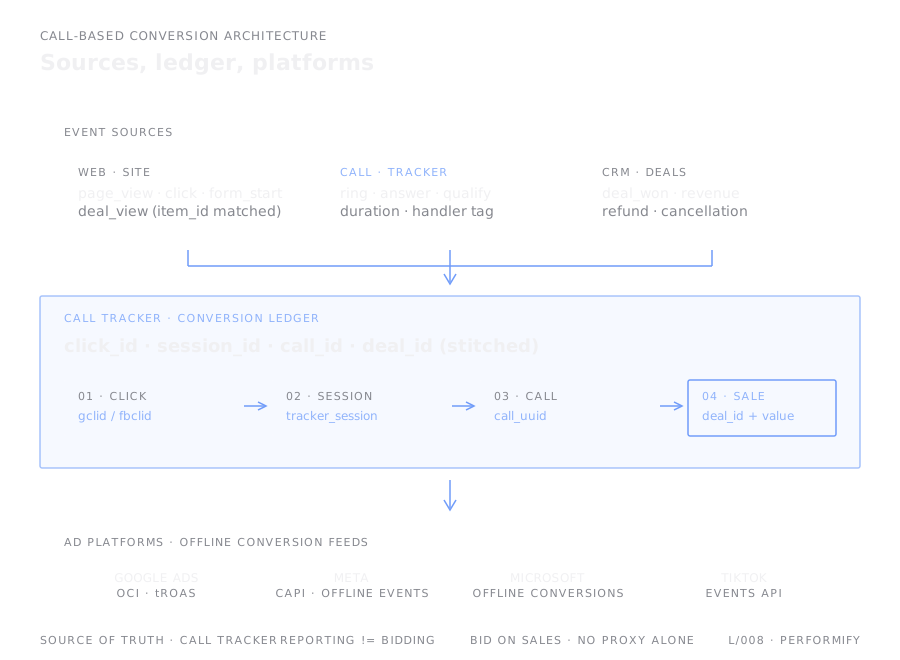
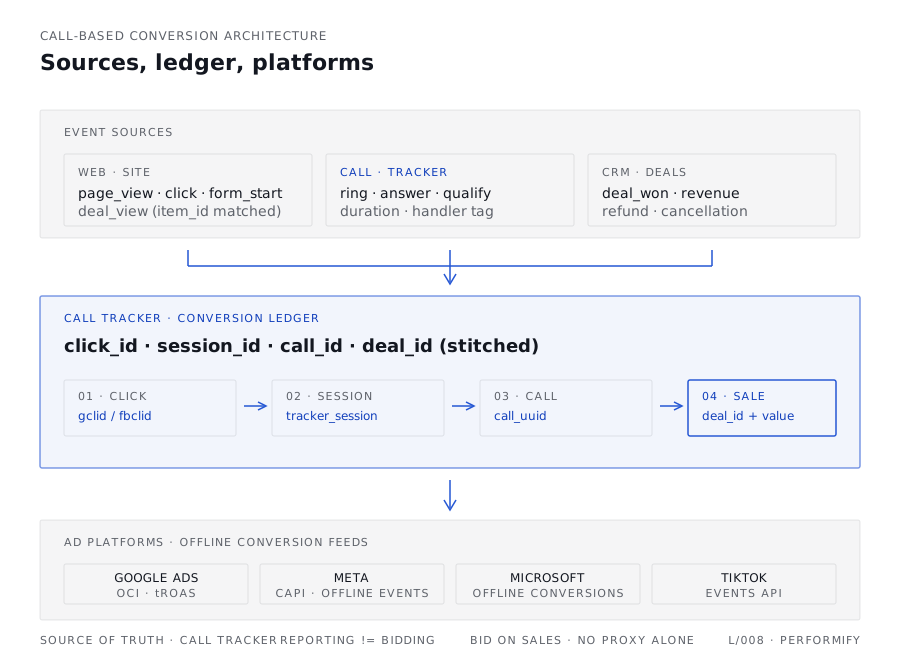
Layer 1 · Call tracker to ad platforms (offline import)
Every event the platforms bid against comes from the call tracker via offline conversion import. For Google Ads, the import matches on the gclid, or on the gbraid or wbraid that Google uses instead on some iOS traffic. Since 15 June 2026, new integrations have to send these imports through the Data Manager API rather than the Google Ads API, so check which route your tracker uses. Microsoft Ads imports offline conversions against the MSCLKID. Meta takes them through the Conversions API, with action_source set to phone_call; its separate Offline Conversions API closed in May 2025. Five events worth tracking, with explicit reporting-vs-bidding roles:
| Event | Definition | Bidding role |
|---|---|---|
| Call connected | Phone connected for ≥ N seconds | Reporting only (selects for volume not value) |
| Call duration | Seconds connected (parameter on the Call event) | Parameter, not standalone goal |
| Qualified call | Call dispositioned as qualified by the call centre | Reporting only (directional, not commercial) |
| Offline sale | Phone sale confirmed in CRM, with revenue value | PRIMARY · this is what you bid against |
| Online sale | Web checkout completed (where applicable) | PRIMARY · the on-site half of the same outcome |
The mistake to avoid at this layer is letting bidding optimise against "call connected" or, worse, the on-site phone-button click. Both select for volume rather than value. The user who calls and qualifies and closes a £400 deal is identical, from the call-button-click event's perspective, to the user who calls in confused and hangs up after twelve seconds. Bid against the sale, with revenue.
Layer 2 · On-site events (audience and dynamic-creative join)
The on-site tag layer's job is to build audiences and to provide the join key that lets dynamic creative serve the package the user actually browsed. Critical events:
| Event | gtag.js | Meta Pixel | Purpose |
|---|---|---|---|
| Page view | page_view | PageView | Audience building, custom segments |
| Package view | view_item with item_id | ViewContent with content_ids | Required for dynamic retargeting against the deals feed |
| Compare action | view_item_list | Custom Search | "Comparer" audience signal |
| Callback request | generate_lead | Lead | Friction-reducer audience signal (not a bidding goal until Phase 4, and then only alongside Sale) |
| Call-button click | Custom contact | Custom Contact | Call-intent audience signal (reporting only) |
The implementation failure to check for first at this layer is shipping view_item / ViewContent without the item_id / content_ids parameter, or shipping IDs that don't match the deals feed. Dynamic retargeting then can't serve the package the user looked at, falls back to generic creative, and the work on the feed is wasted. Audit the values, not just the events.
Layer 3 · Reporting vs bidding
Two events are bidding goals: offline sale (with revenue) and online sale (with revenue). Everything else is reporting until Phase 4, when proven callback leads join them. Adding qualified call or callback request as bidding goals is tempting: they're directional, they fire often and the platforms learn faster. But the platform then learns to find more of the proxy, and the people who trigger it aren't always the people who buy. If a campaign doesn't have the conversion volume to bid against sales, use a max-conversions strategy on the closest sale-shaped event for an explicit bootstrap window (30 days), then promote the campaign to sale-bidding once volume supports it. Don't leave it on a proxy and forget.
The five-tier funnel
Five sequential stages, numbered top-of-funnel (cold) to bottom-of-funnel (hot). Each one seeds the next. Note that the numbering is conceptual rather than chronological: Search closers (tier 5) usually exist before this work begins, with prospecting and retargeting added above them. The funnel works because the stages are sequential and named, not because the targeting inside any single stage is clever.
Tier 1 · Prospecting (create demand)
Performance Max (PMax) Prospecting on Google, prospecting campaigns on Meta, plus YouTube/Demand Gen for video-first awareness. Audience signals are cold: competitor browsers, life-event segments (moving home, becoming a parent, redundancy depending on category), value-tagged lookalikes seeded from your highest-LTV CRM cohort, custom intent built from your proven mid-funnel Search query winners. The job is to seed intent and build the retargeting pool. Success is measured by non-brand Search query uplift and hot-pool growth, not by platform-attributed CPA. Bid prospecting against target CPA (tCPA) on the closest sale-shaped event initially, and graduate to target return on ad spend (tROAS) once 30+ days of sale data have accumulated.
Tier 2 · Warm retargeting (8-30 days)
Comparers and provider-intent visitors who browsed but didn't call. PMax Retargeting and Meta Retargeting carry the load, with dynamic creative serving the specific package the user browsed via the deals-feed join. Messaging is offer + trust: concrete reasons to come back to a specific deal, social proof against the competitor they were comparing against. Land on mid-funnel pages (deal detail, comparison) not on the contact page; warm users aren't ready to dial yet.
Tier 3 · Friction reducers (capture non-callers)
Some high-intent users will not call in the moment, no matter how good the warm creative is. Callback request forms, schedule-a-call widgets, live chat and WhatsApp give them another way through. Treat the resulting interactions as both a conversion path in their own right (handle them properly in the call centre, attribute them, fold them into bidding once volume supports it) and as a high-intent audience signal for retargeting. Measure success in two parts: completion rate by page type, and qualified-call / sale rate from callback leads vs direct callers. To check the channel adds calls rather than displacing them, watch whether direct calls fall when callbacks start.
Tier 4 · Hot retargeting (0-7 days)
Call-intent visitors (clicked the call button but didn't connect), repeat visitors within seven days, and call-tracker-qualified users with no sale yet. PMax Retargeting and Meta Dynamic Retargeting at maximum bid, plus RLSA bid-up on Search for the same audience pool. Click-to-call CTAs, urgency, deal freshness. Don't cap budget on this tier while it passes the week-6 checks against the Search baseline: these people have already considered you, so some of the sales the platforms credit here would have come anyway.
Tier 5 · Search closers (existing, protect)
In a call-based business that already advertises, brand search and high-intent non-brand search are usually the existing layer: large, mature, on tROAS, with the call tracker already integrated. The upper-funnel channels above are there to seed intent that returns here. The job at this tier is protection: defend impression share on core terms, layer RLSA bid-ups for warm and hot recency tiers, daypart against call-centre close rates (bid up during high-close hours, down during low). Don't cut Search spend to fund the new channels; new spend is additive.
The audience grid
The retargeting layer needs an audience grid, not a single list. Recency tiers cross with engagement depth to give nine usable segments and explicit suppression boundaries. Build them once, in both GA4 (for Google) and Meta Custom Audiences (for Meta), and the rest of the programme inherits them.
| Recency | Window | Treatment |
|---|---|---|
| Hot | 0-7 days | Maximum retargeting bid. Hot-pool growth is a leading KPI for prospecting channels. |
| Warm | 8-30 days | Dynamic creative against the deals feed. Sequential messaging. |
| Cool | 31-90 days | Suppress from active retargeting. Use as seed only for prospecting lookalikes. |
Depth tiers separate intent levels within a recency window. A page-view-only visitor, a comparer, and a call-intent visitor all sit inside the same 0-7d window but are worth very different bids. The grid uses three depth tiers: content reader (landed on a content page or top-of-funnel article), comparer (engaged with comparison or deal-list pages, fired view_item_list), and call-intent (viewed a deal-detail page with view_item, or clicked a call-button without connecting).
Cross-product audiences matter where the business sells more than one product to overlapping buyers. A user looking at TV packages today is a viable broadband prospect tomorrow. Build cross-product visitor pools explicitly and use them for cross-sell prospecting; use within-product sales as suppression so you don't keep paying to acquire the customer you already have.
The two suppression rules that matter most: suppress in-product converters from in-product retargeting (don't pay to chase the customer you've just won), and suppress active callbacks for 24-48 hours (the user is already in a queue; another ad won't help, and may annoy).
The non-negotiables
Five rules that hold the whole architecture together. If any one of them is missing at launch, pause the affected campaign rather than ship it half-built. Partial implementations train the platforms against the wrong signal and the cleanup takes weeks.
| Rule | Applies to | Why |
|---|---|---|
| Brand exclusions on PMax | All PMax campaigns | Search takes priority over PMax only on queries identical to one of its keywords, and not always then, so without brand exclusions PMax can take the rest of your branded queries and claim credit for conversions that would have happened anyway. Brand Search's reported return then falls and PMax's rises, while total sales stay where they were. |
| Separate retargeting + prospecting | PMax, Meta | In a shared budget, the bidding spends first where sales come cheapest, which is retargeting, so prospecting gets what's left. Separate campaigns, independent budgets, separate signals. |
| Suppression lists active | All channels | Within-product converters, non-eligible segments, active callback queue (24h). Without these, you pay to acquire users you've already won and to chase users who can't buy. |
| Sale (with value) as primary bidding goal | All campaigns at maturity | Never call-connected, never call-button-click. These select for volume; sale selects for value. Use a sale-shaped proxy only as an explicit time-boxed bootstrap. |
| Search impression share monitoring | Google Search + PMax | Brand exclusions and negative keywords on core non-brand terms keep PMax retargeting mostly on additional reach (Display, YouTube, Gmail) rather than in your Search auctions. Verify weekly that core-term impression share is flat or improving as PMax scales; a drop is the leading indicator that exclusions need tightening. |
The four-phase rollout
Infrastructure first. Retargeting second. Prospecting third. Friction reducers fourth. Each phase de-risks the next; each phase generates the data the next one needs. A bad launch costs more than the wasted budget: it leaves polluted bidding data that takes weeks to unwind. Keep the build light until the data proves it works, then scale complexity, budgets, creative and analytics together.
Phase 1 · Infrastructure (months 1-2)
- Wire the call tracker (Infinity, Calltracks, CallRail, Invoca or equivalent) to Google Ads, Microsoft Ads and Meta as the source of truth. Verify call and sale events appear in each platform's events manager with the correct values before any new spend.
- Verify the dynamic-number session window covers your 90th percentile browse-to-call gap. Pull the timing data from the call tracker; default DNI windows are often shorter than the actual gap, especially for upper-funnel channels.
- Deploy
view_item+item_idon package detail pages (Google). DeployViewContent+content_idson the same pages (Meta). Verify the IDs match the deals-feed IDs end-to-end. - Build the recency × depth audience grid in GA4 and Meta Custom Audiences. Mirror the tiers exactly across both platforms so audience-level reporting is comparable.
- Build suppression lists from call-tracker sales, non-eligible segments, and the active callback queue.
- Upload value-tagged CRM seeds to Google Customer Match and Meta Custom Audiences. In the builds I've run, I work to at least 1,000 records per platform (the platforms accept fewer), so the list left after matching is still big enough to carry a bidding signal.
- Build the deals feed to a minimum spec covering ID, name, price, image, landing URL, availability, and any product-specific fields the platforms accept (Google: Merchant Center / PMax catalogue; Meta: Commerce catalogue). Same join-key IDs as on-site events.
- Scope friction reducers with product/engineering. Rank by feasibility and expected impact; build in Phase 4.
Phase 2 · Retargeting build (months 2-4)
- Launch PMax Retargeting. Brand exclusions on, URL expansion off, customer acquisition setting on, deals feed connected, audience signals from your hot and warm audience tiers. Audience signals guide PMax rather than limit it, so expect some new users in this campaign too.
- Launch Meta Retargeting against the recency × depth grid. Sequential messaging windows: days 1-3, 4-7, 8-14, 15-30. Different concept per window.
- RLSA bid-ups on Google Search and Microsoft Search for the hot tier (0-7d call-intent and repeat visitors).
- Ship the creative matrix: 3 concepts × 3 funnel stages (offer, trust, urgency) × 2 variants = 18 executions. Image and video; vertical 9:16 for Meta Reels and YouTube Shorts; 1:1 for feed; 16:9 for in-stream and Display.
- Bid retargeting against tROAS on PMax (call-tracker sale value) and Maximise Conversions on Meta (Purchase event from the call tracker, via the Conversions API).
Phase 3 · Prospecting (months 4-6)
- Launch only after retargeting passes week-6 governance (see below).
- PMax Prospecting on a separate campaign with cold audience signals (competitor browsers, life events, custom intent built from Search winners). Independent budget. Never shared with retargeting PMax.
- Meta Prospecting on value-based lookalikes (1% + 1-3% from CRM seed), Advantage+ audience on, exclude all site visitors so Meta doesn't double-count retargeting.
- Initial bid strategy: tCPA on the closest sale-shaped event. Promote to tROAS once 30+ days of sale data have accumulated.
- Scale prospecting budgets in 5% increments, gated on incremental sales vs Search baseline rather than platform-attributed CPA.
Phase 4 · Friction reducers (months 6+)
- Deploy the friction reducer mechanisms scoped in Phase 1: usually some combination of callback request, schedule-a-call, live chat, and WhatsApp. Pace by what the call centre can actually pick up; a callback request that goes unanswered is worse than no callback request at all.
- Integrate friction-reducer audiences into retargeting (high-intent signal, even if the user didn't immediately call).
- Measure: callback completion rate by page type, and the qualified-call and sale rate from callback leads vs direct callers. The test that matters is whether direct calls fall when callbacks start.
- Once incremental volume is proven, fold callback Lead events into bidding alongside Sale, never as a replacement. In Google Ads, make the Lead action primary or add it to a custom goal with Sale. Otherwise it's reported but not bid on.
Week-6 governance
Six weeks after each new channel goes live, run an explicit pass-or-fail decision against the criteria below. Giving a channel "more time" past week six, in the hope that the bidding will stabilise, keeps spending on something that hasn't shown it works. If a channel hasn't passed the criteria by week six on a launched-clean infrastructure, it usually hasn't because of a structural reason that more time won't fix.
The baseline is the trailing four weeks of pre-test Search performance: qualified calls, sales, and CPA. The primary measurement method is uplift versus that baseline, so avoid launching into a seasonal swing: a four-week baseline can't separate the channel's effect from demand that was already moving. Network attribution is a directional signal; it is never the primary decision metric.
| Decision | Criteria |
|---|---|
| Pass · scale budget in 5% increments |
· Incremental sales above Search baseline in test period · Search impression share on core terms flat or improved · Hot audience pool (0-7d) grew vs pre-launch · No correlated increase in direct / branded organic (which would suggest the new channel is claiming credit for traffic it didn't drive) |
| Fail · cap or pause |
· Incremental CPA more than 30% above Search CPA after the 6-week window · Search impression share drops (a cannibalisation signal) · Direct or branded traffic increases coincide with the new channel launch · PMax serving on broad inventory unrelated to deal or compare pages (check the feed quality and brand exclusions first) |
The 30% CPA tolerance is a starting heuristic. Calibrate against your actual margin per sale and any provider bonus thresholds: a channel that pushes you past a volume bonus tier can earn back its higher per-unit CPA from bonus revenue, and a channel that doesn't can't. The CFO version of this calculation matters more than the platform-attributed version.
Where this came from
This architecture is the distilled version of a full-funnel build for a UK comparison and reseller business with a £500k+/month Search account, a roughly 75/25 split between phone and online sales, and an existing Infinity integration. The work itself was specific to that business (competitor set, package mix, call-centre operating model, provider bonus structure), but the architecture carries over to other businesses where the main conversion is a phone call. Phone share varies by category. In the engagements where I've used this method, it has run higher in home services and lower in financial services. The comparison and reseller businesses sat around 70-80%, the range in the headline. Other engagements where I've used variants of this method include telco resellers, insurance comparison, financial services, and home services, with the same five-tier funnel and the same phased rollout shape.
The architecture and phasing are an S01 Strategy output; the day-to-day account work that follows is the S02 Paid Media Management side of the same engagement.
The two methods this rides on top of are Enhanced Conversions + CAPI (the on-site signal recovery layer) and Two-layer measurement (the MMM oversight layer, for the effects offline import can't tie to a click, such as upper-funnel video).