Every analytics team has the same backlog: a queue of "quick questions" that each need someone to open BigQuery, remember which column is net of refunds, write the SUM and the GROUP BY, and paste the answer back into Slack. The questions are simple. The bottleneck is that they all route through one or two people who know the schema.
Google's Conversational Analytics is the tempting fix: point a Gemini data analytics agent at a BigQuery table and let people ask in plain English. It will happily write the SQL, run it, and narrate the answer. The catch is that it will do this whether or not it has understood your data correctly, and a confident, well-formatted wrong number is far more dangerous than no answer at all.
So this is not a "switch it on" guide. It's how I set one up for a single-brand Shopify store running paid media, so that three properties hold: it is read-only by design, it is accurate on the questions where the column semantics are easy to get wrong, and the whole thing is reproducible from code rather than clicked together in a console.
Best fit: teams with a clean BigQuery mart, recurring stakeholder questions, and one or two analysts who have become the bottleneck.
Bad fit: raw event tables, messy attribution joins, or teams that have not yet agreed what revenue, refunds, spend, and targets actually mean.
Conversational Analytics is a Google Preview (beta) feature. Role names, API surfaces, and the Data Studio integration (the product Google is renaming back from Looker Studio) are all still moving. Treat anything below as correct-as-of-build and re-check the current docs if a call returns PERMISSION_DENIED or a screen looks different.
Why chat-with-your-data, and why now
Text-to-SQL has existed for years and mostly disappointed, because a model staring at raw column names has no idea that revenue_net already has refunds removed, or that "this year" means your fiscal year and not the calendar one. It guesses, and the guess looks authoritative.
Two things changed. The models got materially better at SQL, and, more importantly, Google's Conversational Analytics API lets you attach authored context to the agent: a written system instruction, per-field descriptions, and a set of verified example questions with their correct SQL. That context is the difference between a novelty and a tool you would let a non-analyst use unsupervised. The model is no longer guessing what your columns mean; you've told it.
The reason to do it now, while it's still Preview, is that the cost of trying is almost nothing (you pay only standard BigQuery compute for the queries it runs) and the learning compounds: the context you author for the first table is exactly the artifact you reuse and extend for the next one.
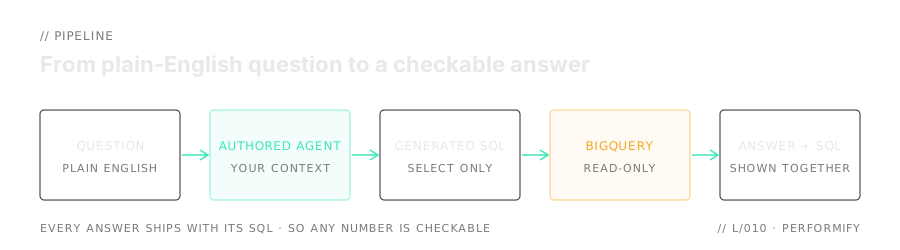
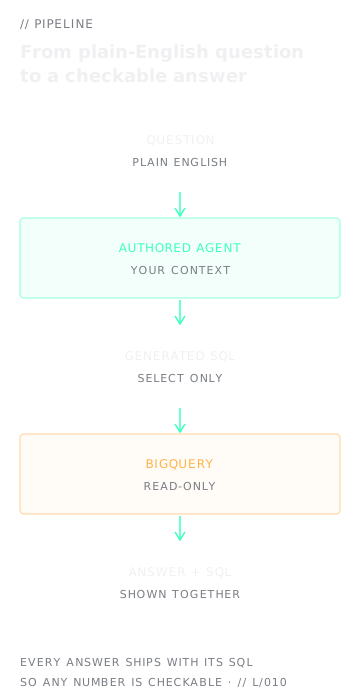
Start with the safest possible table
The instinct is to point the agent at your richest, most-joined dataset so it can answer everything. Resist it. The first agent should be the one with the least room to be wrong, because the entire point of the pilot is to learn whether authored context makes it reliable, not whether it can survive a six-table join.
For an e-commerce + paid-media setup, the ideal first table is a pre-aggregated daily performance mart: one row per day per channel, a single currency, every hard calculation already done upstream:
date              DATE        -- calendar day
channel           STRING      -- 'google_ads' | 'meta' | 'email' | 'organic' | ...
revenue_gbp       NUMERIC     -- net of refunds, ex-tax, in GBP
refunds_gbp       NUMERIC     -- refunds for that day (already removed from revenue_gbp)
ad_spend_gbp      NUMERIC     -- paid media spend (NULL/0 for non-paid channels)
budget_gbp        NUMERIC     -- planned spend for the day
revenue_target_gbp NUMERIC    -- planned revenue for the day
fees_gbp          NUMERIC     -- agency/platform fee, pre-computed daily
fiscal_year       STRING      -- e.g. 'FY26' (year starts 1 May)
A table like this only needs SUM and GROUP BY to answer almost anything. There are no FX joins, no row-explosion risk, no fan-out. The only real risk left is semantic (which column means what), and that is exactly the risk authored context is designed to remove. A wide, UNION-heavy table stitched from several sources is a deliberate later step, because its structure is far easier for a model to misread.
Pick the first table by how cleanly its semantics can be described, not by how much it covers. If you can write down what every column means in a paragraph, the agent can be made reliable on it. If you can't, neither can the model.
Enable the APIs, lock it down with IAM
There are two APIs to enable on the project: the Conversational Analytics engine and the underlying Gemini-for-Cloud service.
gcloud services enable geminidataanalytics.googleapis.com \
  cloudaicompanion.googleapis.com --project=your-project
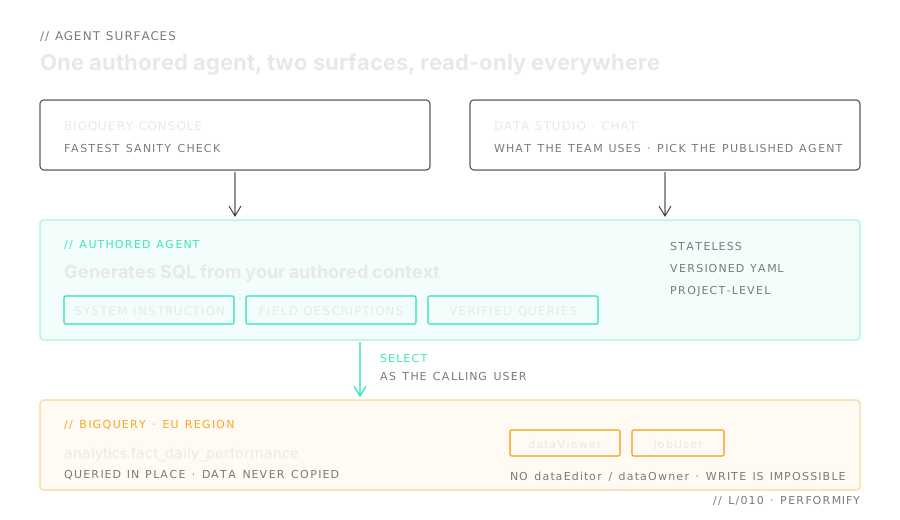
Now the part that matters most. The agent does not run with some elevated service identity; it runs its BigQuery jobs as the calling user. That is the core of the security story, and it cuts in your favour: if the caller holds no write permission, the agent physically cannot write data, no matter what SQL the model dreams up. Read-only becomes a hard IAM boundary, not a matter of trusting the model to behave, as long as the calling user holds no broader BigQuery write roles elsewhere.
So you grant the least-privilege set: enough to create and chat with agents, run queries, and read the one dataset, and nothing that can mutate data.
| Role | Scope | Why |
|---|---|---|
| geminidataanalytics.dataAgentCreator | project | create / update / delete agents |
| geminidataanalytics.dataAgentUser | project | chat with agents |
| cloudaicompanion.user | project | Gemini for Google Cloud usage |
| bigquery.dataViewer | the one dataset | read the table (read-only) |
| bigquery.jobUser | project | run the generated SELECT jobs |
Note what is absent: no dataEditor, no dataOwner. The combination of dataViewer + jobUser can read the table and run SELECT jobs and nothing else: a SELECT cannot INSERT, UPDATE, DELETE, or DROP. Scope the data-read with an IAM condition so it's limited to the single dataset:
PROJECT=your-project
PRINCIPAL="user:you@example.com"

# Conversational Analytics + Gemini + job execution (project-level)
for ROLE in \
  roles/geminidataanalytics.dataAgentCreator \
  roles/geminidataanalytics.dataAgentUser \
  roles/cloudaicompanion.user \
  roles/bigquery.jobUser; do
  gcloud projects add-iam-policy-binding "$PROJECT" \
    --member="$PRINCIPAL" --role="$ROLE" --condition=None
done

# Read-only access to the data, scoped to ONE dataset via an IAM condition
gcloud projects add-iam-policy-binding "$PROJECT" \
  --member="$PRINCIPAL" --role="roles/bigquery.dataViewer" \
  --condition="expression=resource.name.startsWith('projects/$PROJECT/datasets/analytics'),title=analytics_only"
Finally, authenticate locally with Application Default Credentials so the script runs as you:
gcloud auth application-default login
The read-only guarantee comes entirely from scoping the principal, not from the agent being incapable of writing. If any user you share the agent with also holds dataEditor or dataOwner, the model could in principle generate write SQL that runs as them. Keep everyone on dataViewer + jobUser and grant no write roles. That is the core of the safety model: IAM is the hard boundary, so audit each user's effective permissions before you share.
Author the context that makes it accurate
This is the craft, and it's where a pilot succeeds or quietly misleads. An agent with no context is just text-to-SQL with a nicer wrapper. The Conversational Analytics API lets you attach three things, and you should treat all three as a single versioned artifact, a YAML file in your repo rather than console clicks:
- A system instruction: the business glossary and rules in prose. What "this year" means, which channels run paid media, how revenue and fees are defined.
- Per-field descriptions: one line per column stating what it means and, crucially, what not to do with it.
- Verified queries: a handful of canonical questions paired with the correct SQL, which the agent reuses and learns the shape of.
system_instruction: |
  You answer questions about analytics.fact_daily_performance: one row per
  day per channel for a single Shopify store. All values are GBP; never
  attempt currency conversion. The fiscal year starts on 1 May; when a
  question says "this year" or "YTD", use fiscal_year, not the calendar year.
  Only google_ads and meta are paid channels; email, organic and direct have
  no ad_spend_gbp, so exclude them from spend / budget / ROAS questions.

field_descriptions:
  revenue_gbp: "Revenue, already NET of refunds and ex-tax. Do NOT subtract
                refunds_gbp again; that double-counts."
  refunds_gbp: "Refunds for the day. Use only as a numerator for refund rate;
                it is already removed from revenue_gbp."
  fees_gbp:    "Agency/platform fee, pre-computed per day. SUM it; never
                recompute from a rate."
  ad_spend_gbp: "Paid media spend. NULL/0 for non-paid channels."

verified_queries:
  - question: "What was the refund rate by channel over the last 90 days?"
    sql: |
      SELECT channel,
             SAFE_DIVIDE(SUM(refunds_gbp), SUM(revenue_gbp)) AS refund_rate
      FROM analytics.fact_daily_performance
      WHERE date >= DATE_SUB(CURRENT_DATE(), INTERVAL 90 DAY)
      GROUP BY channel
Every line in there exists to defuse a specific way the model would otherwise go wrong. The refund note stops it double-subtracting. The fees note stops it re-deriving a figure that's already authoritative. The paid-channel note stops it reporting a ROAS for the email channel. You are not teaching it SQL; you are teaching it your table.
Drive it from code, so it's reproducible
You can create an agent by clicking through the BigQuery console, but then it lives nowhere you can review, diff, or rebuild. Drive it from the API instead, with a small CLI that reads the YAML and pushes it. A single script with create / update / delete / get / ask / eval verbs covers the whole lifecycle, built on google-cloud-geminidataanalytics:
# create the agent from the YAML
python3 manage_agent.py create

# ask a one-off question (stateless)
python3 manage_agent.py ask "How is the store tracking against its revenue target this month?"

# after editing agent_config.yaml, push the change
python3 manage_agent.py update

# tear it down when finished
python3 manage_agent.py delete
There's no magic inside that script. The YAML becomes a Context object (the system instruction, the table reference with its field descriptions, and the verified queries) that you publish as a project-level data agent. The whole of create is about fifteen lines:
from google.cloud import geminidataanalytics as gda
import yaml

cfg = yaml.safe_load(open("agent_config.yaml"))
client = gda.DataAgentServiceClient()

# The agent is just authored context read straight from the YAML:
# the table, its field descriptions, and the verified queries.
table = gda.BigQueryTableReference()
table.project_id, table.dataset_id, table.table_id = (
    cfg["project"], "analytics", "fact_daily_performance")
table.schema = gda.Schema(fields=[
    gda.Field(name=f["name"], description=f["description"]) for f in cfg["fields"]])

ctx = gda.Context(system_instruction=cfg["system_instruction"])
ctx.datasource_references.bq.table_references = [table]
ctx.example_queries = [
    gda.ExampleQuery(natural_language_question=q["question"], sql_query=q["sql"])
    for q in cfg["verified_queries"]]

# Publish it as a versionable, project-level data agent.
agent = gda.DataAgent()
agent.data_analytics_agent.published_context = ctx
client.create_data_agent_sync(request=gda.CreateDataAgentRequest(
    parent=f"projects/{cfg['project']}/locations/global",
    data_agent_id="daily-performance",
    data_agent=agent))
Two deliberate choices pay off here. Use stateless chat for the pilot, so no conversation history is persisted as a project resource; each question stands alone. And keep the agent config in version control, so "improve the agent" is a reviewable diff to the YAML (add a glossary term, tighten a field description, add a verified query) followed by update, not an undocumented change someone made in a UI three weeks ago.
The BigQuery data agent is a resource in your own project. It holds only context: the system instruction, the table reference, field descriptions, and verified queries. It does not copy your data anywhere; it generates SQL that runs against the table in place, in the region the data lives. The model is hosted by Google and billed under your project.
Prove it's right: the eval and the traps
Here is the part most teams skip, and it's the part that separates a demo from something you'd trust. Before you let anyone use the agent, run it against a fixed set of questions you already know the answers to, and deliberately include "trap" questions where a naive text-to-SQL gets the number wrong.
There's no auto-grader; the eval is a manual scored comparison. For each question, check three things: is the number right (against the dashboard or a hand-written query), is the SQL right (does it avoid the known traps), and is the presentation sensible (correct currency, a chart where one helps).
| Trap | What a naive agent does | What the context forces |
|---|---|---|
| Refunds | subtracts refunds_gbp from revenue again | uses revenue_gbp as-is; refunds only as a rate numerator |
| Fees | recomputes fees from a rate × revenue | SUM(fees_gbp), the pre-computed figure |
| Paid channels | reports ROAS for email / organic | excludes channels with no ad_spend_gbp |
| Fiscal year | groups "this year" by calendar year | uses fiscal_year (starts 1 May) |
| Currency | attempts a conversion | renders GBP, no conversion |
On my pilot, a ten-question eval (the everyday questions plus those five traps) came back clean, at a cost that rounds to nothing on this table:
A useful bar for whether the agent is worth widening to other tables: it should get the number right on the ambiguous-metric questions (refund rate, fees, ROAS) with no hand-holding. Anything that fails because of missing context isn't a model failure; it's a prompt to tighten the YAML and re-run.
Put it in front of your team
Because the agent is a project-level resource, the same agent, with all its authored context, is reachable from more than one Google surface. There are a few ways in, in increasing order of polish.
The fastest sanity check is the BigQuery console. Open Conversational Analytics from the left nav, select your named agent from the list (not a blank chat against the raw table), and re-ask the eval questions. This exercises the exact agent your script created, glossary and all.
The version your team will actually use is Data Studio's "Chat with your data" (Google is renaming Looker Studio back to Data Studio, so depending on when you read this the menu may say either). The key is to choose the published agent in the picker, not to start a fresh "direct conversation" with the table; a direct conversation has none of your context, and Google's own docs warn it is less accurate. Same identity, same read-only roles, so everyone stays read-only.
Technical users need no UI at all. The same agent is scriptable from the command line: the API wrapper from step five answers a one-off question with ask, which is handy for spot-checks and for wiring the agent into other tooling. And because every answer ships with its generated SQL, you can confirm any figure independently with a quick bq query against the table using the BigQuery CLI.
A live in-report chat panel (the agent embedded as a tile inside a Data Studio report page) is still rolling out. Google's April 2026 relaunch of Data Studio explicitly folds in BigQuery conversational agents, so first-class embedding is on the way, but it may not be available in your org yet. The reliable pattern in the meantime is a button on the dashboard that links straight to the agent's chat window, so it's one click from the report to the conversation, over the same data.
Cost, caveats, and teardown
Cost. There is no charge for the agent feature itself during Preview; you pay only standard BigQuery compute for the queries it runs. Tag the jobs your own tooling runs (the eval, the cross-checks, any scheduled pulls) with a label so they aggregate cleanly in INFORMATION_SCHEMA.JOBS. With the Python client that is one argument on the job config:
from google.cloud import bigquery

client = bigquery.Client(project="your-project")
job_config = bigquery.QueryJobConfig(labels={"ca-bq-job": "true"})
client.query(sql, job_config=job_config)  # now filterable by that label in JOBS
A small cost command that sums total_bytes_billed for that label over a window is then enough to keep an eye on it. In practice it's negligible for a pre-aggregated daily table.
Caveats worth stating out loud.
- It's a Preview feature under pre-GA terms; behaviour and role/API names can change.
- The agent resource is created in
location = "global", even though the BigQuery compute still runs where your data lives. - Accuracy is never guaranteed: Gemini can produce plausible-but-wrong SQL. That is the entire reason for the eval. Always sense-check any number used in a decision; the agent shows its query, so the check is quick.
- Under heavy shared load you may see transient
429 Resource Exhaustedresponses. This is what client-side retries are for: wrap the API calls ingoogle.api_core.retry.Retrywith exponential backoff so a brief spike is absorbed instead of surfaced to the user.
Teardown. delete soft-deletes the agent (recoverable for ~30 days). Nothing else is provisioned (no datasets, no scheduled queries, no pipeline entries), so there's no cleanup beyond that one call.
The pattern that makes this worth doing is that the work compounds. The authored context you write for the first, safest table is the template for the next one. When you add a second, harder table (one with UNIONs, joins, or fan-out risk) you hit a real architecture choice: a second independent agent with its own YAML, eval, and traps, or a single agent whose context package spans both tables. Prefer the separate agent until you have a clear reason not to. It keeps each eval scoped and honest, stops a regression on one table bleeding into another, and lets the harder table carry the heavier eval it actually needs. Add one validated table at a time, never a single agent pointed at everything and hoped for the best.
The same logic scales past tables to teams. As Finance and Marketing each want their own questions answered, give each domain its own agent, owned by the people who own that data and its definitions, rather than one orchestration agent trying to speak for the whole business. The boundaries that keep an eval honest are the same ones that keep accountability clear: a wrong number has an obvious owner, and improving one team's agent can't quietly regress another's.
If your BigQuery warehouse is already clean enough to dashboard from, it is probably close to being clean enough to question safely. This is rarely an AI project first: it is a data modelling, permissions, and evaluation project that happens to end in a chat interface. The work is in the context, the permissions, and the eval harness.